
Chat on Your Apple Watch with WhatsWatch
Overview
WhatsWatch: Chat on Watch is a third-party desktop application designed to extend WhatsApp functionality to the Apple Watch. Developed by Bitsbaker LLC, the app enables users to access and manage their 1:1 and group chats directly from their wearable device. It serves as a convenient bridge for those who want to stay connected without constantly reaching for their iPhone. The primary purpose of the software is to simplify mobile communication by bringing core messaging features to a smaller, always-on screen.
Target users include professionals, students, and frequent communicators who value quick access to messages during meetings, workouts, or travel. The app is especially useful for individuals who prefer hands-free interaction or want to minimize screen time on their smartphones. Real-world usage scenarios include replying to urgent messages during a commute, checking updates during a workout, or staying in touch with family while on the go.
As a third-party solution, WhatsWatch is not affiliated with WhatsApp or Meta Platforms, Inc. The developer has confirmed that the app does not collect personal data, only anonymized crash reports and debugging information. This transparency supports user privacy, a growing concern in today’s digital landscape.
Key Features & Capabilities
- WhatsApp Access on Apple Watch – Enables full chat interaction, including 1:1 and group conversations, directly from the Apple Watch.
- Text and Voice Messaging – Supports sending both typed messages and voice notes directly from the watch.
- HD Image Viewing – Allows users to view high-definition images shared via WhatsApp on the watch screen.
- Audio and Video Playback – Users can listen to voice messages and play video messages without needing their iPhone.
- Multiple Input Methods – Offers QWERTY keyboard, Quick Replies, Dictation, and Scribble for flexible message composition.
- Custom Keyboard for Older Models – Provides a built-in English QWERTY keyboard for Apple Watch models without the official keyboard.
- Simple Setup Process – Requires only four steps, including scanning a QR code from the iPhone’s WhatsApp app.
These features are particularly beneficial for users seeking efficiency in mobile communication. For example, a professional can quickly respond to a colleague during a meeting using voice dictation, while a student can check group chat updates between classes. The ability to view and play media directly on the watch enhances the user experience, reducing dependency on the paired iPhone.
User Interface, Workflow & Performance
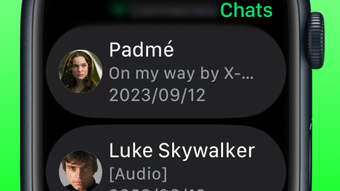
The user interface of WhatsWatch is designed with the Apple Watch’s limited screen size in mind, prioritizing clarity and simplicity. Navigation is intuitive, with a clean chat list and message thread layout. The app organizes conversations in a scrollable list, with recent messages displayed prominently.
Workflow efficiency is enhanced by the inclusion of multiple input methods. Quick Replies allow for rapid responses with pre-defined messages, while Dictation and Scribble support natural, hands-free input. The custom QWERTY keyboard ensures usability across all Apple Watch models, including older generations that lack native keyboard support.
Performance details were not specified by the developer. However, based on general behavior of lightweight iOS applications, the app likely maintains low CPU and RAM usage. Stability appears to be consistent, as the app operates in tandem with WhatsApp’s existing ecosystem. The developer did not provide additional system requirements or performance benchmarks.
Compatibility & System Requirements
WhatsWatch: Chat on Watch is compatible with iPhone and Apple Watch devices. The app supports pairing with any iPhone running the latest version of WhatsApp and any Apple Watch model that can run third-party apps. The installation size is 20.5 MB, indicating a lightweight footprint.
Exact system requirements were not listed. Compatibility information is limited to the supported platforms. Users should ensure their iPhone and Apple Watch are updated to the latest software versions to maintain optimal functionality. The app does not require additional hardware beyond a paired iPhone and Apple Watch.
Pros and Cons
Pros
- Free to download and use with no hidden costs
- Full WhatsApp chat access on Apple Watch
- Supports voice, text, and media messaging directly from the watch
- Custom keyboard ensures compatibility with older Apple Watch models
- Simple four-step setup via QR code
- Privacy-focused design with no collection of personal data
Cons
- Third-party app not officially supported by WhatsApp
- No official updates or support from Meta Platforms, Inc.
- Dependent on iPhone’s WhatsApp connection for functionality
- Performance may vary based on device age and iOS version
- Limited to Apple ecosystem (iOS and watchOS only)
FAQ Section
Is WhatsWatch Chat compatible with all Apple Watch models?
Yes, the app is designed to work with all Apple Watch models that support third-party applications. Older models benefit from the built-in QWERTY keyboard, ensuring consistent functionality.
Does the app collect personal data?
No, the developer confirmed that WhatsWatch does not collect any personal information. It only gathers anonymized crash reports and debugging data for internal use.
How do I update the app?
Updates are distributed through the Apple App Store. Users should check for updates regularly in the App Store app on their iPhone.
Is a paid version available?
No, WhatsWatch Chat is completely free. There are no in-app purchases or premium features.
Can I use the app without an iPhone?
No, the app requires a paired iPhone running WhatsApp to function. It acts as a companion to the iPhone’s WhatsApp app and cannot operate independently.
Final Thoughts + CTA
WhatsWatch: Chat on Watch delivers a seamless, privacy-conscious extension of WhatsApp to the Apple Watch. With full access to messaging, voice notes, and media playback, it enhances on-the-go communication without compromising security. The inclusion of a custom keyboard ensures broad compatibility, while the simple setup process makes it accessible to users of all experience levels.
While it is a third-party app without official WhatsApp backing, its lightweight design, free access, and transparent data policy make it a reliable choice for Apple Watch users. It’s ideal for professionals, students, and anyone who values quick, convenient messaging without constant phone dependency.
Download WhatsWatch Chat now.







